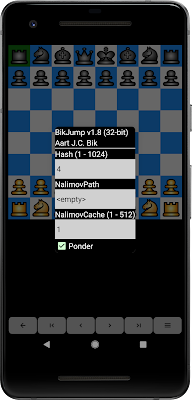
The UCI engine setup dialog in Chess for Android was developed a long time ago when there were not many chess engines available for Android. As a result, I opted for a simple dialog that featured a few, commonly used UCI engine options only (such as hash table size, number of threads, endgame tablebases). However, the options that I picked almost ten years ago no longer serve the wide variety in options of the many chess engines available for Android. Therefore, I decided to re-implement the UCI engine setup and do what the UCI protocol specification actually intended: the GUI should parse all options and build a dialog that allows the user to change them. For engines with only a few options, this yields a concise dialog, as illustrated below with BikJump v1.8. For engines with many options, this yields a more elaborate, scrollable dialog, as illustrated below for Leela Chess Zero. In any case, however, the new implementation gives the user full access to all options! Expect...

Comments
You mention that this is an interesting new way of presenting features in your Android app; can you elaborate? Was this video concocted in some clever new way?